Why Modern Services Need On-the-Fly Image Resizing with CloudFront and Lambda@Edge
Q1. Why do we need on-the-fly image resizing?
Original images are often large and inconsistent in size. Serving them as-is leads to slow loading speeds, increased bandwidth costs, and degraded UI quality. On-the-fly resizing processes the image at request time, making device-specific optimization simple and efficient.
Q2. Doesn’t Lambda@Edge image resizing cost more?
In most cases, it does not. With a 5% cache-miss rate, a service with 10K MAU can reduce monthly CDN bandwidth costs by about $90, while Lambda execution costs stay around $5. As long as the cache remains stable, the total cost decreases.
Q3. What should I watch out for when using Lambda@Edge?
You must consider the 1MB response limit, 30-second execution time, global replication, and distributed logs—which all add significant operational complexity.
Q4. Can small services reduce costs with on-the-fly resizing?
Yes. Even at MAU levels between 1K and 100K, applying WebP/AVIF plus resizing and caching can reduce bandwidth usage by 30–50%.
Q5. Why choose a Managed CDN instead of Lambda@Edge?
A Managed CDN provides resizing, format conversion, monitoring, and caching out-of-the-box. This dramatically reduces development and operational effort. Features like AI-powered queries and usage dashboards add even more convenience.
What Is On-the-Fly Image Resizing?
On-the-fly resizing generates the needed size (e.g., 200×200) or format (WebP, AVIF) at request time.
Because you no longer need to pre-generate multiple versions, you benefit from:
-
Lower storage costs
-
Simpler architecture
-
Easy adaptation to new devices or layouts
Why Has This Become Important?

Modern services must deliver responsive and optimized images across smartphones, tablets, laptops, and even TVs
1) Serve the large original image and downscale on the client
Issues:
-
Slow loading due to large downloads
-
Excessive bandwidth use
-
Additional device-side processing → poor UX on low-end devices
2) Pre-generate and store multiple image sizes
Issues:
-
Storage cost increases 2× or more
-
New layouts require batch regeneration
-
Long-term maintenance becomes increasingly complex
Neither approach scales well for modern multi-device environments.
Lambda@Edge Resizing Architecture
On-the-fly resizing solves these issues by generating the required image only when requested and caching the result in the CDN.
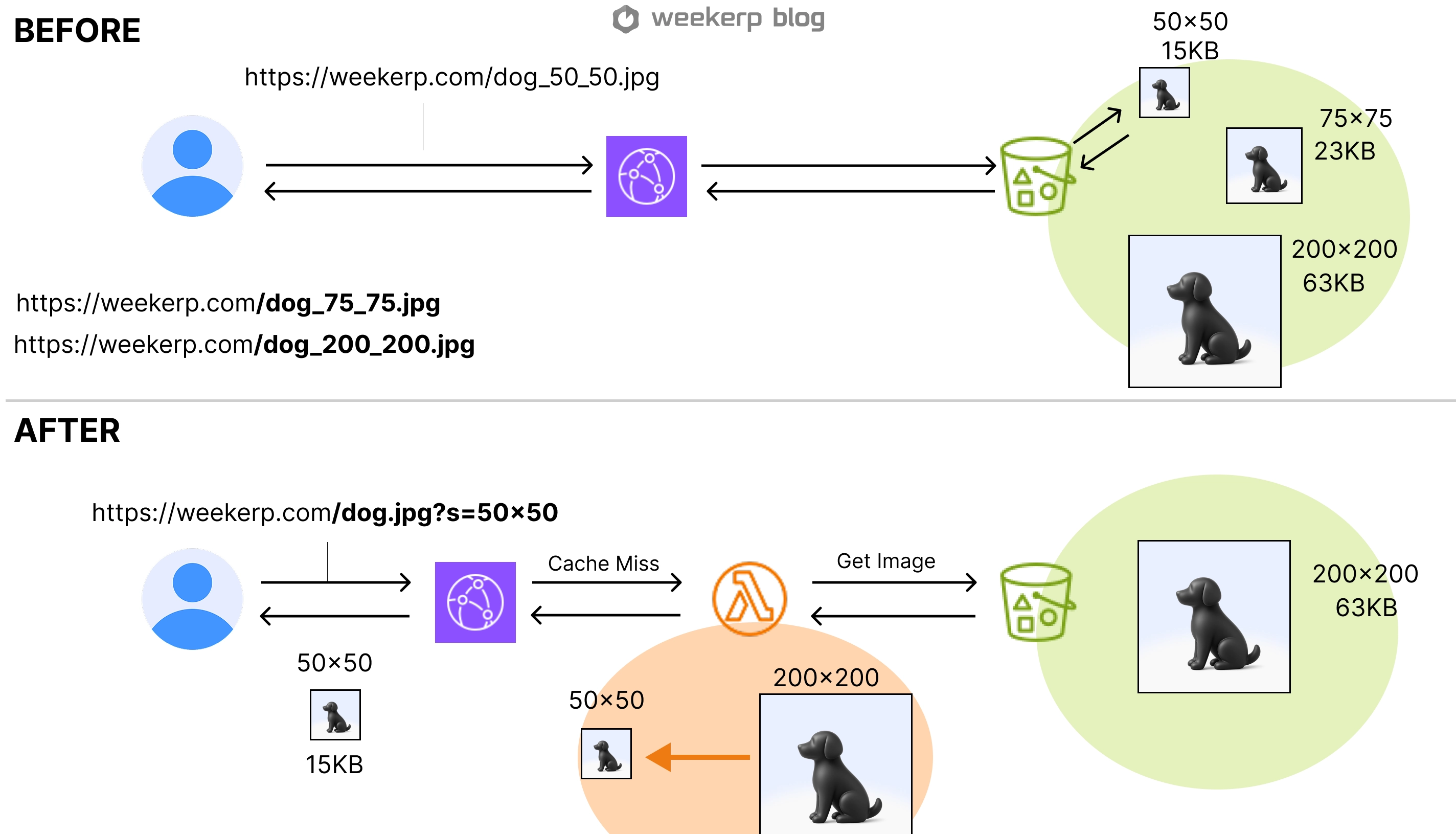
Comparison:
Traditional approach
→ Store multiple image sizes in S3
→ Serve the pre-built file
On-the-fly approach
→ Store only the original image
→ Process ?s=200x200&q=80 at request time
→ Cache the result in CloudFront
This reduces storage overhead and delivers optimized images only when needed.
Doesn’t running Lambda every time cost more?
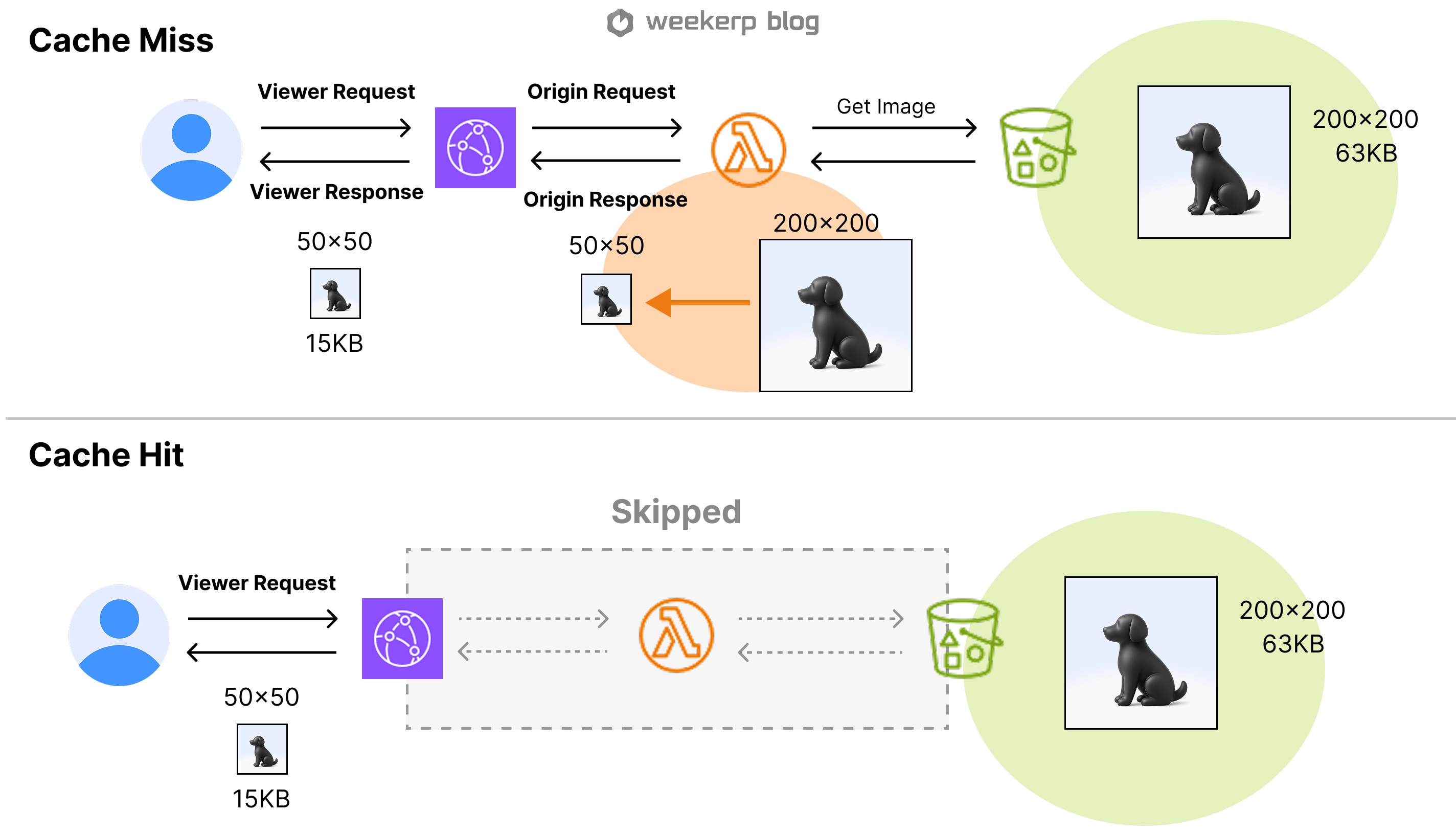
That’s not the case. The key lies in how CDN caching works
There are two types of image requests:
-
Viewer Request: A request sent from the user to the CDN.
-
Origin Request: A request sent from the CDN to the origin (S3 or Lambda) when the CDN does not have the asset cached.
From the caching perspective:
-
Cache Hit: The CDN already has the processed image, so Lambda is not invoked at all.
-
Cache Miss: Lambda runs only once to fetch the original image, process it, and store the result in the CDN cache.
In other words:
-
First request → Lambda execution + S3/origin fetch + result caching
-
Subsequent identical URLs → CDN responds instantly (no Lambda cost)
This is why as long as you keep the miss ratio low, Lambda costs remain a very small fraction of the total, and most of the savings come from “lighter images and reduced bandwidth consumption.”
Real-World Example: Karrot (Danggeun Market)
Karrot is a major Korean marketplace where users upload massive amounts of images.
Daily usage (public data reference):
-
500K uploads
-
200M image requests
-
16,000 GB daily traffic
Without optimization, this dramatically increases CDN cost and slows the app.
After adopting on-the-fly resizing with Lambda@Edge:
-
Bandwidth reduced ~20%
-
Removing duplicate stored sizes saved thousands of dollars per month
This demonstrates how on-the-fly resizing handles both cost efficiency and performance at scale.
What About Smaller Services?
Even small UGC-focused services may see:
-
Thousands of image requests per user per month
-
Hundreds of MB of image data per user
Below is an estimated breakdown:
| MAU | Requests /mo | Traffic | Savings (0.15$/GB) | Lambda Cost |
|---|---|---|---|---|
| 1,000 | 3M | 300 GB | $ 9 /mo | $ 0.5 /mo |
| 3,000 | 9M | 900 GB | $ 27 /mo | $ 1.5 /mo |
| 5,000 | 15M | 1,500 GB | $ 45 /mo | $ 2.6 /mo |
| 10,000 | 30M | 3,000 GB | $ 90 /mo | $ 5.2 /mo |
| 50,000 | 150M | 15,000 GB | $ 450 /mo | $ 26.2 /mo |
| 100,000 | 300M | 30,000 GB | $ 900 /mo | $ 52.4 /mo |
Meaning:
-
WebP/AVIF + resizing + caching → 30–50% bandwidth reduction
-
Lambda cost remains extremely small
Even for small-to-mid-scale services, on-the-fly is an attractive option.
Lambda@Edge vs Managed CDN
There are two ways to implement on-the-fly image optimization:
- Build it yourself with CloudFront + Lambda@Edge
- Use a Managed CDN (Cloudinary, Fastly, Weekerp, etc.)
1) Lambda@Edge (DIY)
Pros:
-
Tight integration with CloudFront
-
Can be extremely efficient and scalable
Cons:
-
Global code deployment
-
Cache strategy and URL design complexity
-
Distributed logs & debugging difficulty
-
1MB response limit / 30s execution constraints
2) Managed CDN
Pros:
-
Resizing, format switching, crop, thumbnail—all via URL parameters
-
No need to manage caching, infra, scaling, errors
-
Dashboard, logs, metrics included
Cons:
-
Pricing models vary (bandwidth vs request vs transformation)
-
Custom logic may be limited
Decision Rule:
-
Choose Lambda@Edge if you want full control and have strong infra experience.
-
Choose a Managed CDN if you want fast setup, predictable operations, and lower maintenance effort.
Weekerp Image Positioning
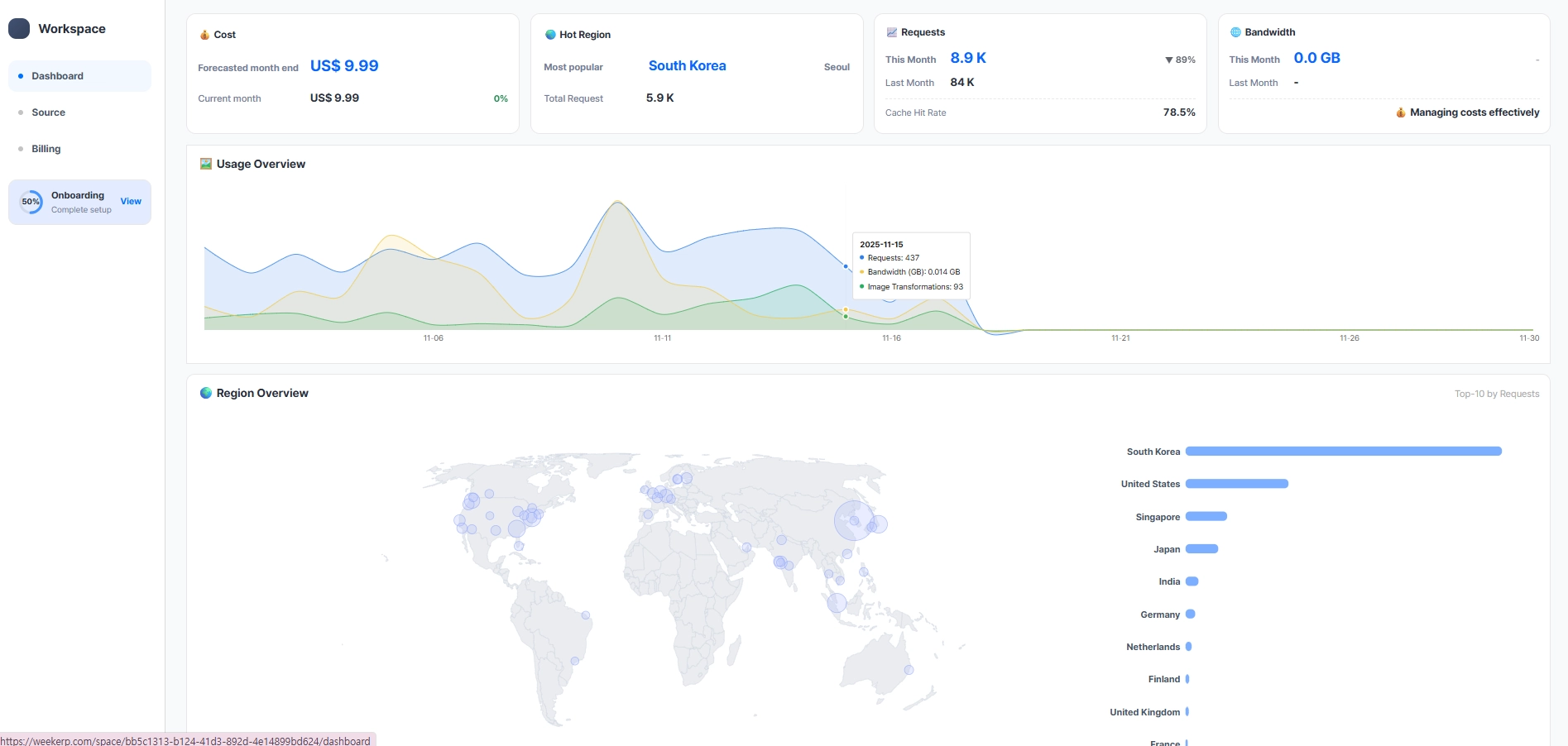
Weekerp Image aims for:
“Keep your existing storage, simplify your operations.”
Key features:
-
No 1MB response limit
-
No execution-time constraints
-
Full dashboards: caching, bandwidth, geographic traffic, hit ratios
-
Natural-language transformation parameters**** (
dog.jpg?ai="resize to 200px") -
Connect S3/GCP/Azure without migration
Weekerp retains the architectural strengths of Lambda@Edge while removing the operational burden.
Final Thoughts: Which Teams Should Choose What?
On-the-fly image resizing is no longer optional—it's a foundational strategy for today’s multi-device, high-quality user expectations.
Summary:
-
High image traffic + many devices → On-the-fly is essential
-
Large teams with infra expertise → CloudFront + Lambda@Edge works well
-
Teams wanting fast adoption + low ops overhead → Managed CDN is ideal
-
UGC platforms, image-centric SaaS, commerce → On-the-fly + Managed CDN = best balance
Meet Weekerp — your fully managed CDN solution.
Meet Weekerp — your fully managed CDN solution.
Go to Weekerp